
2. Retrieve order status
2.1 API Reference
The Order.Create API reference, including the option to execute real-time requests, can be found at: https://developer.pay.nl/reference/api_get_status-1
2.2 Request
curl --request GET \
     --url https://connect.pay.nl/v1/orders/41810945291X15a0/status \
     --header 'accept: application/json' \
     --header 'authorization: Basic QVQtMDExMS03NzAxOmE0Yjg1ODc2ODBmMzQ0NzQ5NjczNmVjMzViMGJjNDhkODZkMjNlZWE='
2.2 Response
{
  "id": "019de290-675d-7c2d-b9ae-02a9b4bb79b3",
  "type": "sale",
  "serviceId": "SL-####-####",
  "description": "Instore Terminal Order #27",
  "reference": "REF1234",
  "manualTransferCode": "0000 0000 0000 0000",
  "orderId": "0000",
  "uuid": "019de290-675d-7c2d-b9ae-02a9b4bb79b3",
  "customerKey": null,
  "status": {
    "code": 50,
    "action": "PENDING"
  },
  "receipt": null,
  "integration": {
    "pointOfInteraction": null,
    "test": false
  },
  "splitPayments": [],
  "stats": {
    "extra1": "extra1",
    "extra2": "extra2",
    "extra3": "extra3",
    "tool": "tool",
    "info": "info",
    "object": "object",
    "promotorId": 0,
    "domainId": "WU-1234-5678"
  },
  "transferData": {
    "key": "value"
  },
  "amount": {
    "value": 100,
    "currency": "EUR"
  },
  "authorizedAmount": {
    "value": 0,
    "currency": "EUR"
  },
  "capturedAmount": {
    "value": 0,
    "currency": "EUR"
  },
  "checkoutData": null,
  "payments": [
    {
      "id": "019de290-675e-7817-9276-16d5098cd0c4",
      "paymentMethod": {
        "id": 10,
        "input": null
      },
      "billingLineId": 10,
      "customerType": null,
      "customerKey": null,
      "customerId": null,
      "customerName": null,
      "customerMethod": null,
      "ipAddress": "127.0.0.1",
      "secureStatus": true,
      "paymentVerificationMethod": 21,
      "status": {
        "code": 50,
        "action": "PENDING"
      },
      "currencyAmount": {
        "value": 100,
        "currency": "EUR"
      },
      "amount": {
        "value": 100,
        "currency": "EUR"
      },
      "authorizedAmount": {
        "value": 0,
        "currency": "EUR"
      },
      "capturedAmount": {
        "value": 0,
        "currency": "EUR"
      },
      "supplierData": null,
      "recurring": false
    }
  ],
  "createdAt": "2026-05-01T10:03:27+02:00",
  "createdBy": "AT-1234-1234",
  "modifiedAt": "2026-05-01T10:04:27+02:00",
  "modifiedBy": "TGU 123456",
  "expiresAt": "2026-05-01T10:18:27+02:00",
  "completedAt": null,
  "links": {
    "status": "<status_url>",
    "abort": "<abort_url>",
    "redirect": "<redirect_url>"
  }
}
Common Statuses
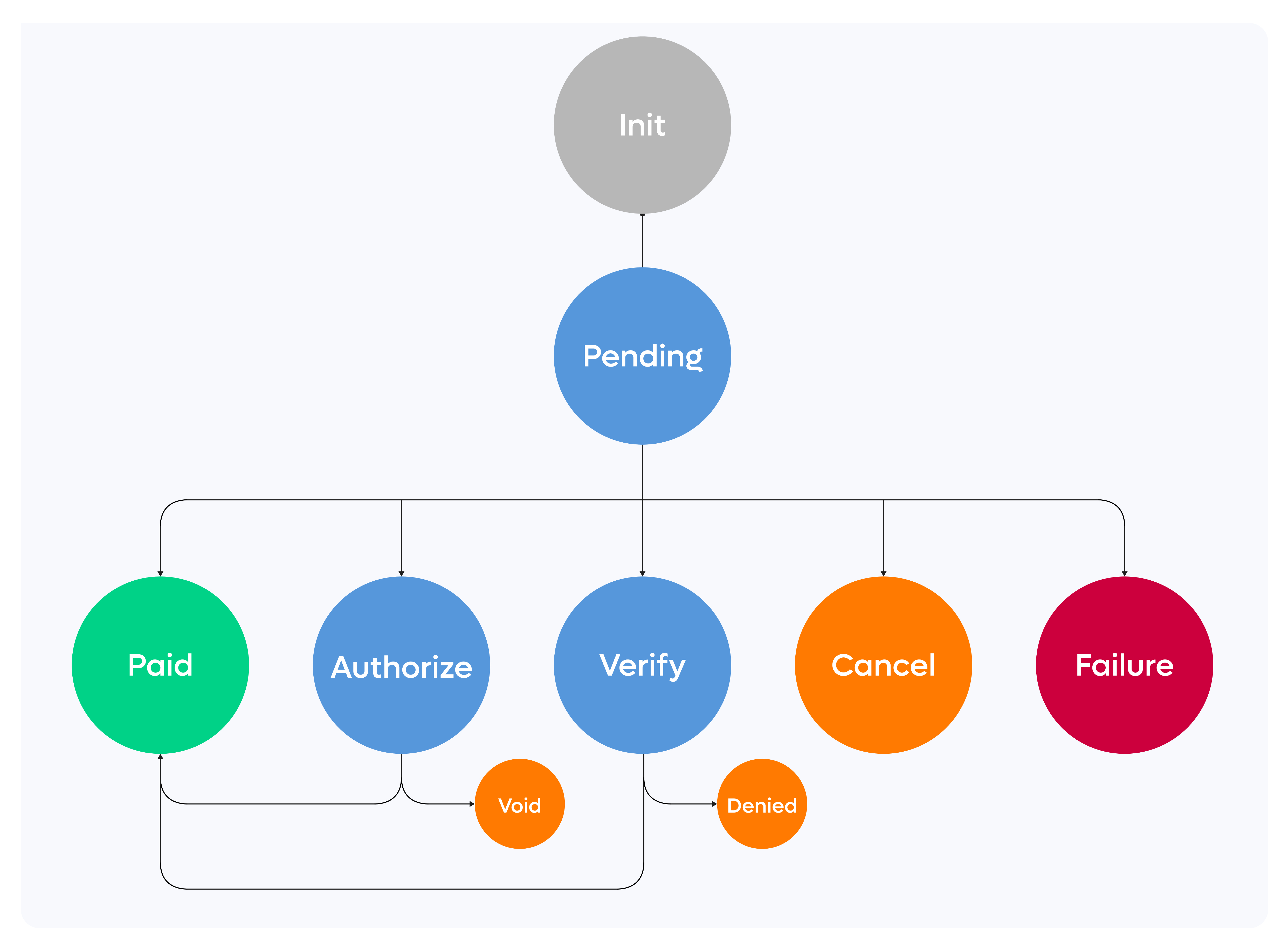
99% of all transactions have the status PENDING when the transaction is initiated. It can change to PAID after a successful payment or to CANCEL if the payment fails. However there are also other statuses used within the PAY. platform.
Pending Statuses
| Code | Status | Description |
|---|---|---|
| 20 | INIT | Transaction is started (Paylink) no payment method is selected yet. |
| 20 | PENDING | Transaction is created on the payment method, data must be provided by the Payer to proceed (bank selection / card data inserted) |
| 50 | PENDING | Data is received, send to the payment method, we wait for there response. Payment can be send into an processing status |
| 90 | PENDING | Data is provided to the Payer, we wait for the a synchronical response of the bank or third party. If we receive the Payment, transaction will be send into a processing state |
| 98 | PENDING | Provider or Issuer confirmed that the payment is send, but the funds are not received yet (for Pay By Bank only) |
Processing statuses
| Code | Status | Description |
|---|---|---|
| -90 | CANCEL | The payment has been cancelled by the user (Or voided using the legacy API's) |
| -80 | EXPIRED | The payment or authorisation has expired. |
| -64 | DENIED | The payment was cancelled by an user or via the API by the transaction:decline endpoint |
| -63 | DENIED | The payment was rejected by the payment processor. In case of Buy now pay later methods this means that the customer did not pass the credit check. |
| -61 | CANCEL | ORDER API ONLY: The payment has been voided after a successful authorization |
| -60 | FAILURE | The payment could not be processed due to an error at the payment method, processor or issuer. |
| -51 | PAID_CHECKAMOUNT | Order is not completed, because the amount paid by the customer does not match the original order amount. If a user sends in a banktransfer that not equals the requested amount |
| 80 | PARTIAL PAYMENT | Partial payments are used with gift cards that do not cover the full amount of the order. The order can still change to PAID when a second transaction is performed. |
| 85 | VERIFY | The payment is treated as suspicious by the verify module. The status needs to be determined by means of an additional check. |
| 95 | AUTHORIZE | The payment has been reserved and can be captured. This status is used for credit card payments and BNPL. |
| 97 | PARTLY_CAPTURED | The payment has been partly captured. You can void or capture the remaining autorised part. |
| 100 | PAID | The payment was successful. |
After processing statuses
If a transaction is changed after the PAID status.
| Code | Status | Description |
|---|---|---|
| -71 | CHARGEBACK | Chargeback of a credit card payment. |
| -72 | REFUNDING | The payment will be refunded (you can still cancel this). |
| -81 | REFUND | The payment has been refunded. |
| -82 | PARTIAL REFUND | The payment has been partially refunded. |
Refund processing statuses
| Code | Name | Exchange action |
|---|---|---|
| 301 | Created | REFUND:ADD |
| 310 | Sent to bank | REFUND:SEND |
| 316 | Processed | REFUND:RECEIVED |
| 313 | Declined | REFUND:DECLINED |
| 319 | Storno / Reversed | REFUND:REVERSED |
Updated 3 months ago
Did this page help you?