
Full integrated (SDK)
Build Seamless Card Present In-App Payments with PAY's Full Integrated SDK
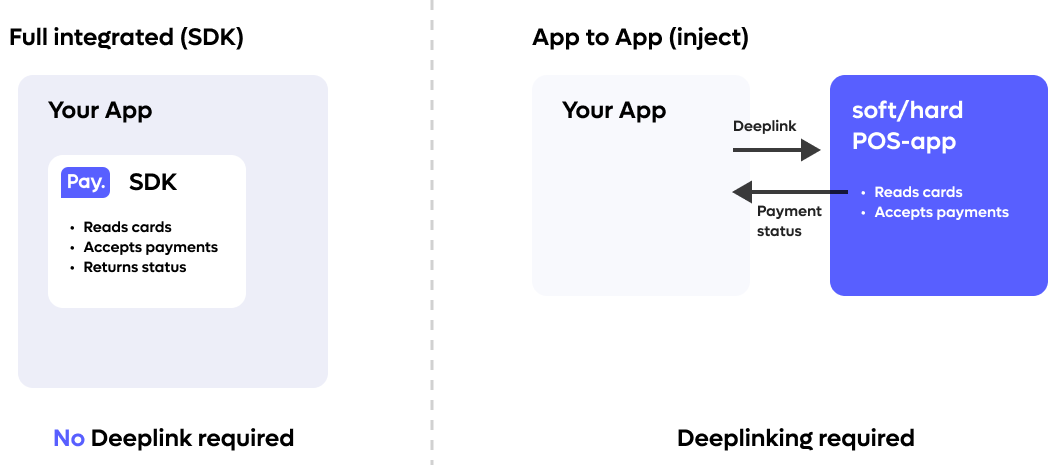
For a more "native" experience we also offer an embedded SDK. If you implement this SDK you will be able to accept payments inside your own App. However, this is an extended integration approach, the significantly easier way to get started is to utilize our same device inject which requires little to no setup.
SDK status:
SDK Costs
| Description | Unit | Price |
|---|---|---|
| Project support fee | Project / Hour | Contact you accountmanager |
| Per license | One - off | € 450,- |
| Per license | Monthly | € 90,- |
How to gain access
Make sure you have integrated the PAY.POS app with inject before you can apply for SDK. Eligibility is based on the amount of transactions done via inject flow
In order to gain access to our integrated SDK you must submit an inquiry to [email protected] and mention the following data:
| Field | Value |
|---|---|
| Merchant / Partner Code | M-XXXX-XXXX (Billable Partner) |
| Organization Name: | |
| Current PAY.POS app version | Did you integrate the APP2APP redirect? |
| Flavor: | Native or React Native |
| Platform SDK | Android SoftPOS / PAX Hardpos / Sunmi Hardpos and/or TTPOI iOS |
| App identifier Development: | |
| App identifier Production: | |
| App distribution: | Apple Store / Google Playstore / Sunmi Store / Other (explain) |
| SHA-256 for Production: | For Google Play store you can find it in the console, for Sunmi store see below |
| Integration support channel: | TEAMS / SLACK / Ticket System |
| Project Team users | List with email addresses that we can invite after project approval |
Tap to Pay on iPhone
For Tap to Pay on iPhone (iOS) you need to complete the following form for your app. You should see a form from Apple requiring you to fill in some information about your organization and what you need access to.
Requirements:
- iOS 18 or higher
- iPhone only (iPad not supported)
- Your project supports CocoaPods or swift package manager
- Make sure you have contacted PAY's support for an integrationId (required for initSDK)
- Make sure you have access to the Tap to Pay on iPhone entitlement. You can request this via this form
Android SoftPos
Requirements:
- Android v8.0 or higher (minSDK 26)
- Android security patch is not older than 2 years
- Device support NFC (and is enabled)
- Make sure you have contacted PAY's support for an integrationId (required for initSDK)
- Make sure you have the gradle credentials from PAY's support
- Make sure you have a personal access token on Github with
read:packagesscope
A hardPOS device (like the Sunmi P series or PAX) is not supported via this SDK
SHA-265 KEY
To Generate a SHA-256 fingerprint use the following command:
keytool -list -v -keystore <your_keystore_name.jks> -alias <your_key_alias>Sunmi HardPos
Requirements:
- Only Sunmi P-devices are supported: device list
- Make sure your P-device has the following software requirements:
- SunmiPayHardwareService version 3.3.0 or higher
- Remote Key Injection (RKI) app version 1.3.32 or higher
- The RKI app must also have a certificate
- if one or both are too lower, please contact Sunmi support
- Make sure you have contacted PayNL support for an integrationId (required for initSDK)
- Make sure you have a personal access token on Github with read:packages scope
PAX HardPos
Requirements:
- Only PAX Paydroid devices are supported
- Make sure your PAX device is enlisted on PAY's PAX portal
- Make sure you have contacted PayNL support for an integrationId (required for initSDK)
- Make sure you have a personal access token on Github with read:packages scope
React Native
Requirements:
Both old & new architectures are supported.
- Other requirements are dependent on the platform itself
- Switching between (Android) softpos & hardpos is possible during build time - docs
Important: Implement SDK loggingMake sure the sendLogs() functionality is implemented and that SDK logging is can be enabled with enabledLogging = true.
When an issue occurs, these logs are essential for PAY. to investigate what happened on the device. Without them, troubleshooting SDK-related issues can be significantly limited.
See Send logs for the implementation.
Updated about 2 months ago