
Retry schemes
Scheme for additional attempts after failed exchange calls
Retrying failed exchanges
When PAY. calls your Exchange URL after a status update, our system will wait no more than five seconds for a response. However, it is possible that your server is not available just then or that a number of taxing processes are running that keep the server from responding in time. In that case, we will terminate the exchange call and view the request as failed. This may mean that your server has not processed the status update (correctly) and that the order status listed in your own back office does not match the one in PAY.’s Admin Panel.
To resolve this issue, you can use a so-called “retry scheme.” This ensures that the exchange call is repeated (a number of times) at a later time until we have received a correct response. When setting up a retry scheme, you can select the maximum number of times to repeat the call. If your script has not sent the correct response yet once this number has been reached, we will notify you via email. PAY. advises all merchants to use Retry Scheme. Here is how to set it up:
Select the Sales Locations tab in the Global Management System and click on “edit” next to the sales location for which you want to set up a retry scheme.
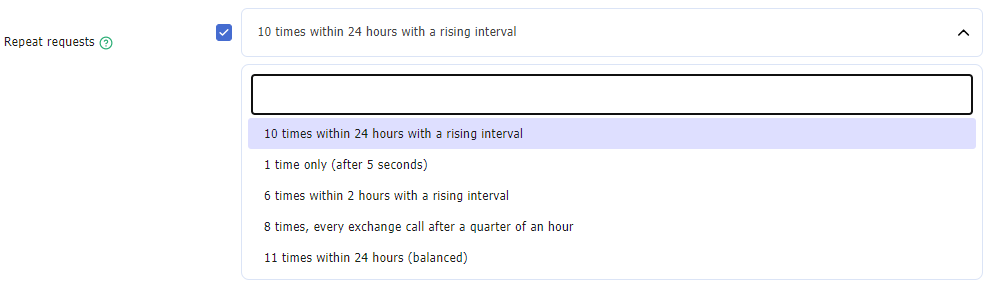
Specify how many times you want the call to be repeated with the “Repeat call” field. For most merchants, “six times within a two-hour period” is the recommended setting. Remember to save your changes.
An email on latest retry optionIf you do not activate a retry scheme and the exchange fails or if you do have a retry scheme and the last attempt fails, we will send an e-mail. You set the people via merchant -> users-> edit and then activate the 'technical problems' option.
Intervals
The table below shows the time between the various repeat calls.
10 times within 24 hours (ascending) | 11 times within 24 hours (balanced) | 8 times every 15 minutes | 6 times within 2 hours | 5 seconds retry | |
|---|---|---|---|---|---|
| 1st | 1 second | 10 seconds | 15 minutes | 30 seconds | 5 seconds |
| 2nd | 3 seconds | 30 seconds | 30 minutes | 50 seconds | |
| 3rd | 10 seconds | 1 minute | 45 minutes | 70 seconds | |
| 4th | 30 seconds | 2 minutes | 60 minutes | 5 minutes | |
| 5th | 60 seconds | 1 hours | 75 minutes | 30 minutes | |
| 6th | 5 minutes | 3 hours | 90 minutes | 60 minutes | |
| 7th | 30 minutes | 6 hours | 105 minutes | ||
| 8th | 60 minutes | 10 hours | 120 minutes | ||
| 9th | 12 hours | 14 hours | |||
| 10th | 24 hours | 19 hours | |||
| 11th | 24 hours |
Triggering the Retry Scheme
GET & POST Exchanges (Legacy)
When using standard GET and POST methods we will mark an exchange as "success" if your server's response begins with the word "TRUE". Any response that does not start with "TRUE" will be marked as "failed" and will kick in the Retry Scheme when turned on in the Global Management System.
Valid response:
TRUEValid response when using the exchange seperator:
TRUE|YOUR COMMENT
Update the SeperatorIf you like to use another Seperator, update the settings in the GMS
Valid but failed response, this will trigger the Retry Scheme:
FALSE|YOUR COMMENTInvalid response, this will trigger the Retry Scheme:
ANYTHING OTHER THAN: TRUEJSON Exchanges
When exchanging with JSON we'll expect the response to be in JSON format. Herein on the main level the "result" key is used to determine a "success" or "failed" exchange.
Valid response:
{
  "result": true
}
Valid result with custom data:
{
  "result": true,
  "description": "Exchange is marked as successful"
}
Valid but failed response, this will trigger the Retry Scheme:
{
  "result": false,
  "description": "Exchange is marked as failed"
}
Invalid response, this will trigger the Retry Scheme
{
  "description": "Exchange is marked as failed"
}
Updated about 1 year ago